Dense Text Blocks
Long descriptions can hide the exact part, movement, or sequence the reader needs to understand.

Turn complex product information into clean visual guidance for assembly, operation, safety, maintenance, troubleshooting, and everyday use. We develop manual-ready illustrations that help readers see parts, actions, sequences, and relationships at a glance.
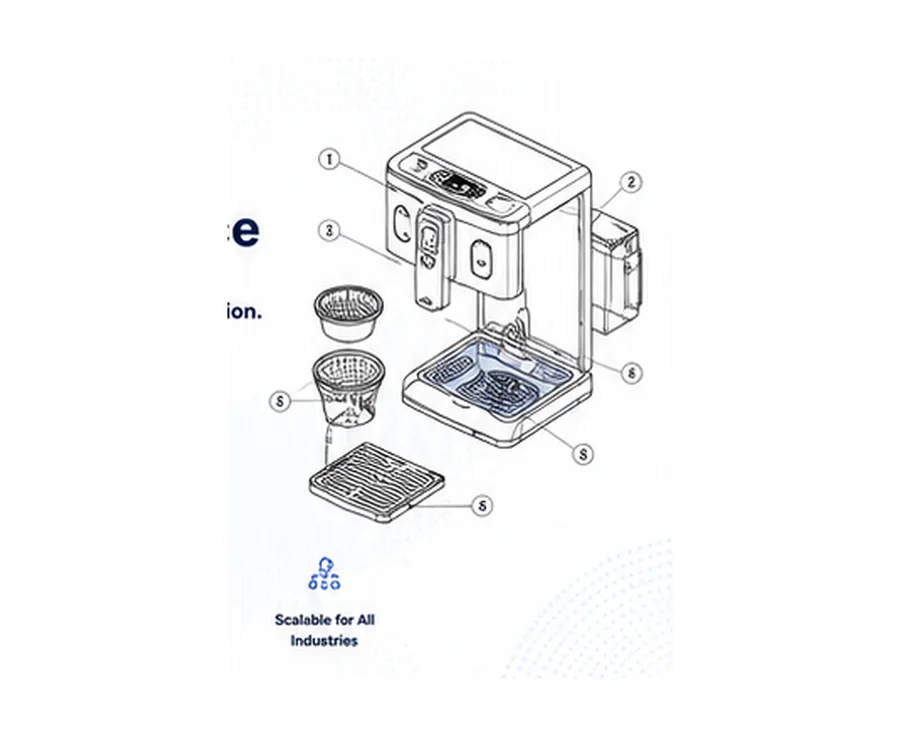
A small illustration set gives buyers a practical entry point while keeping more detailed exploded, sequential, or CAD-derived artwork available as custom scope.
Suitable for: Best for manuals that need a handful of clear visual aids to explain parts, controls, or straightforward procedures.
for up to 5 simple manual-ready line, callout, or step illustrations from clear source references
User Manual Illustration Service starts at ₹10,000 for up to 5 simple manual-ready line, callout, or step illustrations from clear source references.
Buy Service NowExploded assemblies, dense mechanical detail, CAD conversion, many sequence frames, 3D rendering, or extensive engineering validation are quoted above the starting illustration set.
When a procedure is easier to show than explain, text alone can leave users guessing. Purpose-built illustrations make location, order, direction, and relationships visible.
Long descriptions can hide the exact part, movement, or sequence the reader needs to understand.
Users may not see how components fit together, which side faces outward, or where a part belongs.
A procedure can fail when the reader cannot clearly see what comes first, next, and last.
Changing numbers, names, arrows, or callout styles can make an otherwise correct manual harder to scan.
Interface instructions are difficult to follow when controls, buttons, and navigation paths are not visually anchored.
Illustration scope is tailored to the manual, product, and source material. The following are common visual requirements we can assess for a project.
Separate components visually so the reader can understand position, order, and assembly relationships.
Parts & assemblyShow a task in clear visual stages so each action can be understood without relying on a large block of text.
Operating sequenceUse labels, numbers, leaders, and part references to connect the visual to instructions, parts lists, or tables.
Labels & referencesIllustrate hazards, prohibited actions, protective steps, or caution points when the required safety message is supplied.
Safety communicationShow placement, orientation, mounting, connection, and setup steps using the available technical references.
Setup & installationDepict access points, replacement steps, cleaning tasks, service areas, and recurring maintenance actions.
Maintenance guidanceAnnotate interfaces, controls, menus, buttons, and navigation steps for software-enabled products and digital workflows.
Interface instructionsPresent dimensions, orientations, reference points, or simplified technical details when they are part of the supplied documentation need.
Technical referenceThe service turns rough visual information into a structured illustration that is easier to place, review, and follow inside the manual.
Photos, sketches, drawings, screenshots, parts references, or existing manual pages may contain the right information but not yet communicate it cleanly.
Relevant parts, sequence, line style, labels, callouts, and page context are organised into a clear visual draft for review.
After review, the illustration is cleaned, checked for visual consistency, and prepared in the agreed format for the documentation workflow.
User manual illustration is created around instruction, sequence, identification, and repeatable documentation use—not merely visual decoration.
| Focus | Photo / Screenshot Only | Generic Graphic Illustration | User Manual Illustration Service |
|---|---|---|---|
| Primary purpose | Show the real object or screen | Communicate a visual concept | Explain a user action, part, sequence, or relationship |
| Parts identification | Limited when the view is crowded | Depends on the graphic | Designed for labels, callouts, and part references |
| Assembly sequence | May require multiple photos | Not necessarily instruction-led | Can be structured as visual steps |
| Visual consistency | Lighting and angle can vary | Style may vary by asset | Built around a repeatable manual style |
| Manual placement | Requires page-specific selection and annotation | Requires adaptation | Prepared for agreed documentation use |
| Review emphasis | Image quality and relevance | Brand and visual appeal | Source, labels, sequence, clarity, and consistency |
A consistent illustration system can support the reader from first product identification through normal use, maintenance, and troubleshooting.
The workflow keeps the visual tied to its source information, manual context, and review requirements from the first brief to final delivery.
Share the manual context, product details, illustration list, deadline, and intended use.
We review complexity, source completeness, output needs, and questions that must be resolved before production.
Supply photographs, drawings, screenshots, existing pages, parts information, or style references.
Illustration type, sequence, callouts, composition, and consistent treatment are planned around the manual.
The visual is developed using the supplied references and agreed instruction focus.
Feedback is incorporated and key visual details are checked against the approved source information.
Approved artwork is prepared in the agreed format for the documentation workflow.
Deliverables are confirmed during scoping so the artwork is suitable for the way your manual is authored, reviewed, published, and maintained.
Illustration quality is more than clean line art. The final visual also needs to stay aligned with source references, labels, sequence, and manual style.
Confirm that the illustration is based on the correct supplied references.
Review orientation, relationship, order, and visual logic.
Check references, numbering, leaders, arrows, and placement for consistency.
Review line weight, spacing, icons, annotations, and related illustration treatment.
Confirm that approved changes are reflected before final delivery.
User manual illustrations can support physical products, equipment, devices, systems, and digital workflows where users need clear visual instructions.
Product documentation can contain unpublished designs, internal instructions, or proprietary references. Confidential handling is therefore part of a practical illustration workflow.
The focus is practical: create visuals that belong inside instructions, remain consistent across the manual, and support the reader’s task.
Each illustration is planned around what the reader needs to identify, understand, or do next.
Line weight, arrows, labels, callouts, and related conventions can be kept consistent across the manual.
The visual is developed from the product and documentation references supplied for the project.
Draft stages make it easier to check sequence, callouts, and visual detail before final artwork is delivered.
Output is considered in relation to page layout, digital help content, print, and other agreed documentation use.
Project material can include unpublished product information, so source and review files are treated as controlled project inputs.
Use these answers to prepare your illustration brief, source files, review process, and delivery requirements before requesting a quote.
A user manual illustration service converts product, process, assembly, operating, maintenance, safety, or interface information into clear visuals that can be placed inside instruction manuals and related documentation.
Useful source material can include existing manuals, photographs, sketches, engineering drawings, screenshots, product references, parts lists, style guides, and written instructions. The exact input required depends on the illustration type.
Exploded views can be scoped when the source material clearly shows part relationships, assembly order, and required callouts.
Yes. Existing visual conventions, line weight, callout style, numbering, icon usage, and other supplied style requirements can be used as references during scoping and production.
Safety and warning visuals can be included when the required message, source information, symbols, and placement requirements are supplied.
Screen flows, annotated interfaces, button locations, navigation steps, and other digital-product instructions can be scoped using screenshots or interface references.
Final formats are agreed during scoping based on how the illustrations will be used. Requirements may include manual-ready raster files, vector artwork, PDFs, or editable source files where applicable.
The workflow can include source-reference checks, label and callout review, sequence consistency, visual-style consistency, and final cross-checking against the approved content before delivery.
Existing visuals can be reviewed for redraw or style-standardisation requirements when the original references and desired visual conventions are supplied.
User Manual Illustration Service starts at ₹10,000 for up to 5 simple manual-ready line, callout, or step illustrations from clear source references. Exploded assemblies, dense mechanical detail, CAD conversion, many sequence frames, 3D rendering, or extensive engineering validation are quoted above the starting illustration set.
Turnaround is confirmed after reviewing the number and complexity of illustrations, source completeness, required deliverables, review needs, and requested deadline.
Share the manual type, product or system, approximate illustration count, source-material description, preferred output, deadline, existing style references, and any specific labels, callouts, or sequence requirements.
Tell us what the manual needs to explain and what source material is available. The project can then be reviewed for scope, pricing, and turnaround.
The clearer the source and documentation context, the easier it is to understand the illustration requirement and identify any missing information before production begins.
Share your contact details and illustration requirements below. Pricing and turnaround can be confirmed after the project scope is reviewed.
Share your product references and illustration requirements so the project can be scoped accurately.