Knowledge Strategy & Audit
Review what exists, what users need and where the main content gaps or duplication sit.
- Content inventory and gap review
- User-question mapping
- Content priority and roadmap

Plan, structure and create a practical knowledge base for customers, product users or internal teams. We turn scattered source material into clear categories, task-based articles, FAQs, troubleshooting guidance and maintainable documentation.
This project minimum is intended for teams that need the knowledge base treated as a usable system—combining content organisation with targeted article work instead of pricing only by word count.
Project minimum
Projects from ₹18,000
for a focused knowledge-base sprint covering structure and up to 8 priority articles
Suitable for: A small new knowledge base, priority-area refresh or structured pilot before wider rollout.
Outside the starting scope: Knowledge-base software configuration and large-scale migration engineering are outside this project minimum.
Faster delivery: A shorter pilot can be assessed for a smaller repository with well-organized source material.
Contentxprtz knowledge base projects start from ₹18,000 for a focused sprint covering structure and up to eight priority articles, including content organisation, article work and two review rounds.
Build the foundation, content and operating structure of a knowledge base instead of treating each help article as an isolated page.
Review what exists, what users need and where the main content gaps or duplication sit.
Design categories, labels, article types and navigation around predictable user tasks.
Create practical how-to articles, getting-started guides, feature explanations and FAQs.
Turn operational knowledge into repeatable procedures with clear steps, roles and controls.
Improve titles, summaries, keywords, cross-links and article structure so answers are easier to retrieve.
Set practical rules for ownership, article status, review cycles and controlled updates.
A structured workflow keeps the knowledge base aligned to real user questions while making review, publishing and future maintenance easier.
Understand users, repeated questions, source material, workflows and business goals.
Agree scope, audiences, content types, taxonomy, governance and article standards.
Create the category model, templates, navigation logic and content relationships.
Draft clear task-based articles, troubleshooting content, FAQs and supporting guidance.
Check content against source material, terminology, user flow and agreed quality rules.
Prepare handoff, ownership and a practical maintenance model for future updates.
The service is designed around the full content system: user need, structure, article quality, handoff and long-term maintainability.
Good help content is more than correct writing. Users need to know where to look, recognise the right article, complete the task and move to the next step without unnecessary friction.
Titles, categories and internal links help users locate the right answer.
Templates and terminology create a predictable reading experience.
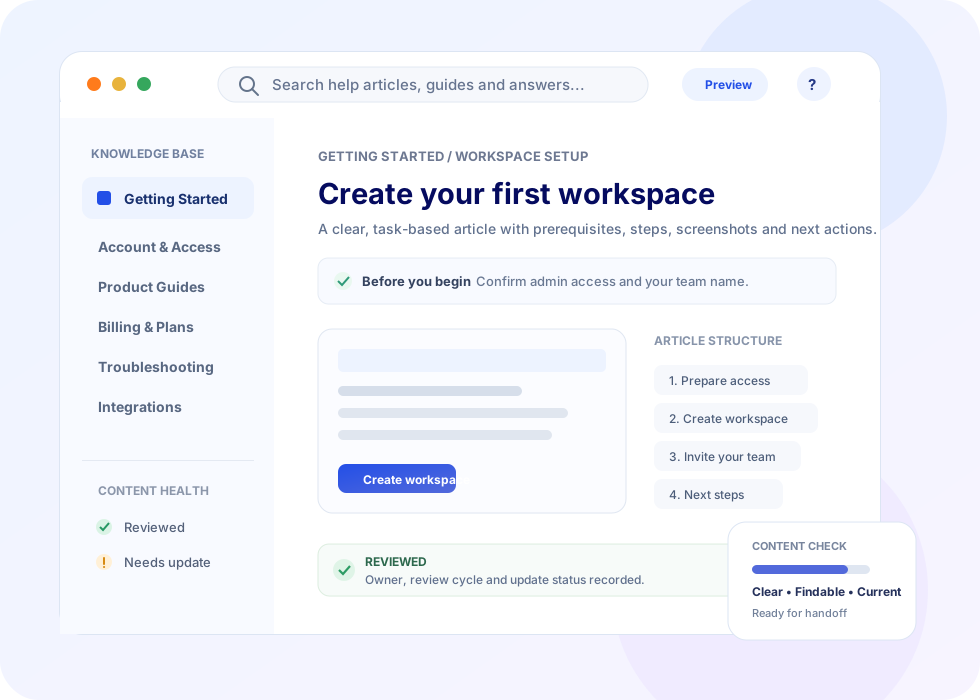
Steps, prerequisites and next actions help users complete tasks.
Ownership, metadata and review cues support controlled updates.
The final deliverables depend on scope. These examples show the kinds of structured outputs a Knowledge Base Service can include without implying a fixed package or price.
Category structure, article templates and task-based help content for common customer journeys.
Getting-started, feature, setup and workflow articles organised around user goals.
Repeatable SOPs, decision guidance, role cues and process documentation for internal users.
Symptom-based articles with checks, fixes, escalation cues and related guidance.
Scope the work around a defined content set, a wider knowledge-base build or an ongoing documentation workflow.
A fixed set of articles, templates or documentation deliverables.
Useful where priorities evolve as source material and content gaps become clearer.
A coordinated writing and documentation stream for a larger programme.
Planned updates, content refreshes and governance support by agreed scope.
The same content principles can support many environments where users need reliable, repeatable answers to product, service or process questions.
Clear source material and a defined review path help keep knowledge accurate, usable and aligned with the people who own the underlying product or process.
Provide the material that lets us understand the real workflow, terminology and user questions.
Each article should be checked for purpose, clarity, structure and consistency before handoff.
Common questions about scope, content types, information architecture, existing knowledge bases, publishing formats, review and turnaround.
A Knowledge Base Service plans, structures, writes and organises self-service information such as help-centre articles, product guides, FAQs, troubleshooting content, SOPs and internal support documentation. The aim is to make answers easier to find, understand, use and maintain.
Depending on the brief, the service can cover getting-started guides, how-to articles, feature documentation, FAQs, troubleshooting steps, policy or process articles, onboarding content, glossary entries, internal SOPs and content templates.
Yes. An existing knowledge base can be reviewed for information architecture, duplicate or outdated content, article clarity, naming consistency, gaps, navigation and maintainability. The final scope should be agreed after the existing material is assessed.
The content approach can be adapted for customer self-service, employee enablement, operations, product support or mixed audiences. Audience, access context and the decisions users need to make should be defined before the content structure is finalised.
Useful inputs include product or process information, existing support material, screenshots or workflows, target users, common questions, current taxonomy, preferred terminology, brand or style guidance and the platform where the knowledge base will be published.
The structure is designed around user tasks, common questions, product or process journeys, content relationships and search behaviour. Categories and article templates should help users predict where an answer will live rather than mirror an internal organisation chart.
Yes. The service can include category design, labels, article naming conventions, tags, content types and governance fields so related knowledge is grouped consistently and can be maintained over time.
For public knowledge bases, content can be structured with descriptive titles, clear headings, concise summaries, internal links and search-friendly wording. Public search optimisation should be aligned with the publishing platform and the organisation's wider SEO approach.
Yes. Content can be prepared for handoff in structured formats such as clean HTML, Markdown, documents, spreadsheets or agreed templates. The exact import or publishing format should be confirmed as part of the project brief.
A knowledge base can use standard article templates, terminology rules, heading patterns, step formatting, callouts, metadata and editorial checks. A lightweight style guide and governance rules can also be included when that is part of the agreed scope.
Where screenshots or diagrams are provided or included in scope, articles can be structured around them with clear captions, step references and descriptive alt text. Visuals should support the task rather than repeat the surrounding text.
Turnaround depends on the number and complexity of articles, the condition of source material, stakeholder review cycles, platform requirements and whether the project includes audit, taxonomy, migration or governance work. Share the required scope and deadline for an appropriate estimate.
Share what you are building or improving, who the knowledge base is for, what source material exists and the type of content you need. Scope, delivery and format can then be assessed against the actual project.
Customer help centre, product documentation, internal knowledge, SOP library or another use case.
Approximate article count, existing sources, known gaps and whether this is a new build or improvement project.
Tell us where the final content will live and any format, migration or template requirements.
Identify subject-matter reviewers, approval needs and any target launch or handoff date.
Provide enough context for the service requirement to be assessed without guessing at price, turnaround or article volume.
Turn scattered information into structured, searchable and maintainable guidance designed around real questions and tasks.