Course & Module Scripts
Structured lesson scripts that connect objectives, explanation, examples, activities, and summaries in a logical learning sequence.

Turn source material, SME knowledge, and learning goals into structured scripts that guide narration, on-screen text, visuals, scenarios, interactions, practice, and assessments from the first screen to the final takeaway.
Pricing and delivery timing are scoped after the course brief and source material are reviewed; no unsupported fixed plan price or turnaround has been added to this page.
Scriptwriting is easiest to buy by finished learning time because narration, on-screen text, visual direction, and interaction cues all contribute to the production workload.
Suitable for: A short explainer, microlearning sequence, or module segment that needs teachable narration and production-ready script structure.
Custom animation design, detailed visual storyboarding, voice recording, video production, extensive subject research, and branching-simulation scripting are quoted separately.
Complete learning-content components for digital courses, training modules, videos, simulations, and blended learning experiences.
Structured lesson scripts that connect objectives, explanation, examples, activities, and summaries in a logical learning sequence.
Presenter or narrator copy with scene direction, on-screen text, demonstrations, callouts, and transitions.
Workplace situations, branching decisions, dialogue, consequences, and feedback written around realistic learner choices.
Knowledge checks, practice questions, feedback, reflection prompts, and short application activities aligned to the lesson goal.
Screen-by-screen scripting that links narration, visuals, interactions, media notes, and production guidance.
Focused scripts for short lessons, mobile learning, refreshers, explainers, and single-objective learning experiences.
A clear sequence from learning brief to production handoff keeps the script instructional, reviewable, and practical for the team that will build the course.
Clarify learners, objectives, source material, format, mandatory content, tone, and production constraints.
Map the course or lesson flow, screen sequence, teaching points, examples, practice moments, and assessment logic.
Write narration, on-screen copy, visual direction, interaction cues, scenarios, questions, and feedback in one production-ready structure.
Check instructional flow, clarity, consistency, duplication, learner actions, source alignment, and reviewer comments.
Deliver an organised script or storyboard-style document ready for design, recording, authoring, or client review.
A strong course script is more than polished prose. It coordinates what the learner hears, sees, does, and understands while giving the production team an executable plan.
Script structure can be adapted to the learning environment, media format, facilitation style, learner attention span, and production workflow.
Facilitator notes, slides, demonstrations, exercises, and session flow.
Narration, screen copy, interactions, activities, and knowledge checks.
Connected scripts for digital lessons, live sessions, exercises, and follow-up.
Voiceover or presenter scripts with visual and on-screen direction.
Short, focused scripts designed for concise screens and quick learner actions.
Practice scenarios, role-play prompts, case activities, and facilitator cues.
The scripting method can be applied wherever a team needs to turn approved knowledge into a structured learning experience. Subject accuracy remains anchored to the supplied source material and SME review.
Examples of the types of learning material that can be structured into an e-learning script.
These are design goals for the content and learning flow, not guaranteed learner-performance statistics.
Script support can fit internal teams, education providers, training businesses, and organisations producing structured learning content for employees, customers, students, or partners.
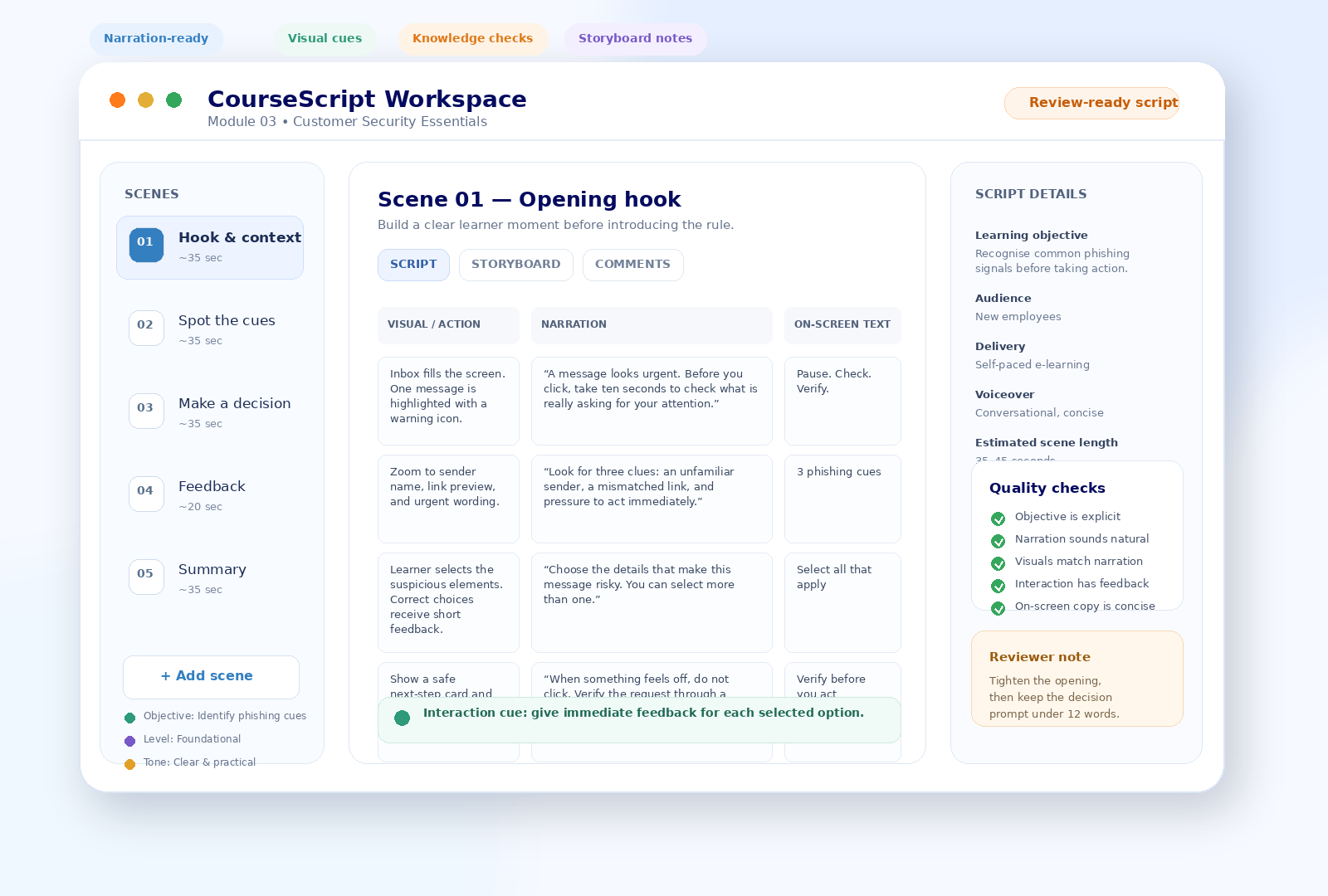
The example below shows the kind of transformation e-learning scriptwriting performs: a simple policy statement becomes a coordinated learner moment with narration, visuals, on-screen guidance, and interaction.
“Employees should check suspicious links before clicking them and report phishing attempts through the approved channel.”
Email inbox on screen. One urgent message is highlighted. The learner can inspect the sender, link preview, and wording.
“A message looks urgent. Before you click, take ten seconds to check what is really asking for your attention.”
Pause. Check the sender. Preview the link. Watch for pressure to act immediately.
Select the suspicious details. Correct choices receive concise feedback explaining why each clue matters and what the safe next step is.
The final handoff is organised so stakeholders can review the instructional content and production teams can understand what to build, record, show, and assess.
Clear spoken-language scripting with natural pacing and transitions.
Concise headings, labels, callouts, summaries, and key-message text.
Notes describing what the learner should see while the script is delivered.
Instructions for clicks, selections, reveals, branching, practice, and feedback.
Questions, answer options, rationale, remediation, and feedback where required.
A screen- or scene-level handoff that production teams can follow consistently.
A production-ready script benefits from clearly separated responsibilities: source accuracy, instructional writing, editorial consistency, and final quality control.
Shapes explanation, sequence, narration, screen copy, examples, practice, feedback, and production cues around the learning goal.
Validates technical accuracy, policy meaning, terminology, mandatory statements, and any subject-sensitive details.
Checks clarity, consistency, tone, grammar, duplication, terminology, and the relationship between narration and screen copy.
Checks scene numbering, directions, interaction logic, answer feedback, missing fields, and handoff consistency before delivery.
Choose a practical starting point based on the amount of content, production stage, and level of scripting support required. Exact scope is confirmed after review.
For a focused learning objective, one module, a pilot lesson, or a contained piece of training content.
Discuss this scope →For a connected course requiring consistent structure, terminology, voice, activities, and assessment logic across modules.
Plan the course →For lesson videos, explainers, demonstrations, or presenter-led learning that needs repeatable script structure.
Scope the series →For teams with recurring course updates, new modules, multiple SMEs, or a continuing learning-content pipeline.
Discuss ongoing needs →Practical answers about source material, narration, storyboards, interaction writing, SME review, course adaptation, and project scoping.
It turns source material, SME input, learning objectives, and delivery requirements into a structured course script. Depending on the project, the script can include narration, on-screen text, visual directions, interaction cues, scenario dialogue, knowledge checks, feedback, and storyboard notes.
Yes. The scripting workflow can begin with source documents, slide decks, workshop notes, product information, policies, transcripts, existing course material, or SME-provided guidance. The brief should identify the intended learner, learning goal, required format, and any mandatory content.
Yes. Narration and on-screen copy can be written as separate script elements so each serves its own purpose. Narration can carry explanation and flow, while on-screen text can stay concise, scannable, and aligned with the visual treatment.
Yes. The script can include clear visual directions, screen actions, graphic suggestions, transitions, character or scenario cues, and notes for the production team. These directions are written to support production without turning the script into unnecessary visual clutter.
Yes. Projects can include interaction prompts, branching decision points, reflection questions, multiple-choice checks, scenario questions, feedback, and short practice activities where they support the stated learning objective.
Yes. Video lesson scripts can include presenter or voiceover narration, shot or screen direction, on-screen text, demonstrations, callouts, transitions, and learner prompts. The structure can be adapted to recorded instruction, screencasts, explainers, or blended course content.
The service can provide storyboard-style scripts that connect each scene or screen with narration, visual direction, on-screen text, interactions, and notes. The exact level of storyboard detail is confirmed during scoping.
Yes. Existing course content can be reorganised and rewritten for clearer instructional flow, shorter screens, stronger narration, improved practice moments, or a different learning format. The amount of redevelopment depends on the quality and structure of the source material.
The scripting process works from the approved source material and client or SME input. Technical or policy-sensitive statements should be validated by the responsible subject-matter expert before final production, while the scriptwriter focuses on clarity, sequence, learner comprehension, and presentation.
Brand, tone, terminology, learner profile, reading level, and style preferences can be captured in the brief and applied across the script. Existing tone-of-voice guidance or sample content can be supplied as references.
Helpful inputs include the learning objective, target audience, source material, required course format, expected module structure, terminology, brand guidance, mandatory statements, SME notes, examples, and any authoring or production constraints.
This service does not use the Editing, Writing, or Proofreading plan catalogue supplied for other Contentxprtz pages. Pricing and delivery timing are therefore confirmed after the project scope, source material, script length, learning format, review requirements, and required outputs have been assessed.
Share the learning goal, audience, source material, intended format, approximate content volume, production stage, and any mandatory requirements. The project can then be scoped around the actual script deliverables you need.
The more clearly the learning context is defined, the easier it is to recommend the right script structure and handoff format.
Provide enough information to assess the learning format, source material, scripting depth, and expected production handoff.
Bring the learning goal, source material, and format. Build a script that tells the production team what the learner should hear, see, do, and understand.