Dense or Ambiguous Instructions
Long sentences, hidden prerequisites, and unclear actions make procedures harder to perform correctly.

Make an existing user manual easier to read, navigate, and use. We edit instructions, procedures, terminology, headings, warnings, captions, cross-references, and document language while preserving the technical meaning in your source material.
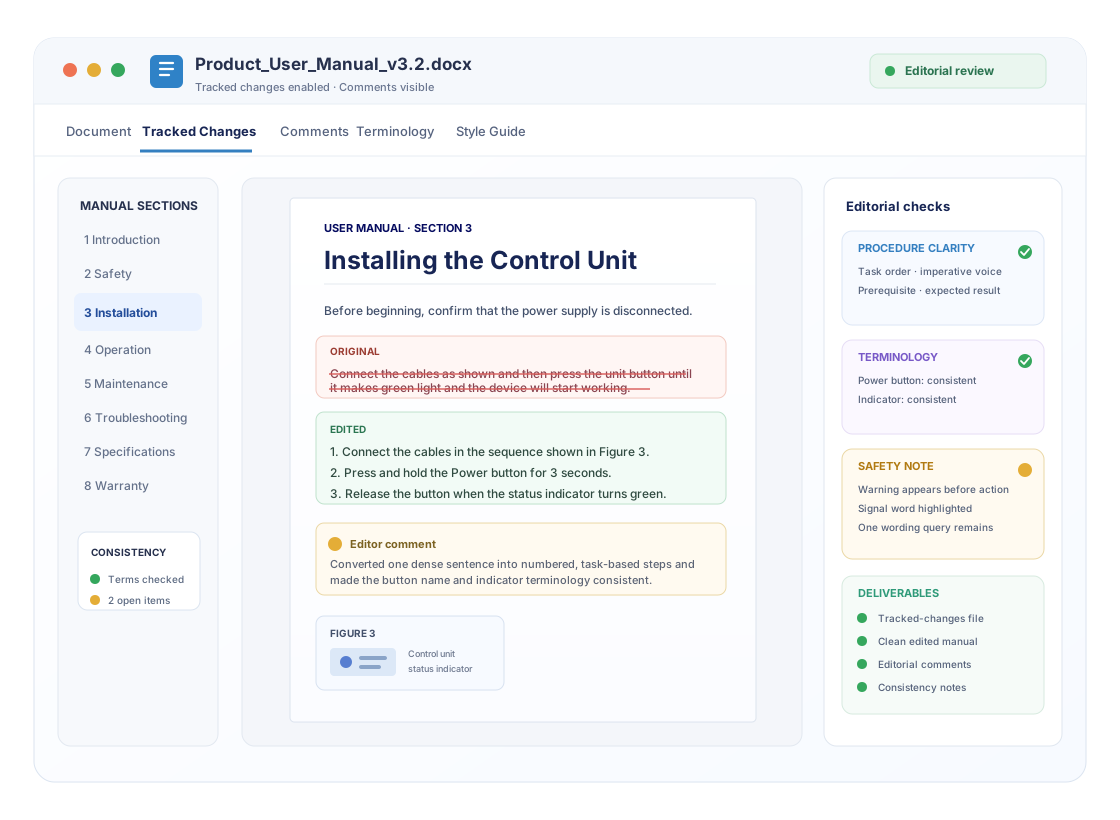
The starting edit is intended for manuals whose procedures and product meaning already exist but need clearer instructions, consistent terminology, and cleaner presentation.
Suitable for: Best for a near-complete manual that needs to become easier for end users to read and follow.
for up to 2,500 words of a drafted user manual
User Manual Editing Service starts at ₹4,000 for up to 2,500 words of a drafted user manual.
Buy Service NowManual rewriting, new procedures, technical validation, new screenshots or illustrations, complex formatting rebuilds, or substantially larger manuals require a broader quote.
Even technically correct content can frustrate users when instructions are dense, terminology shifts, steps appear out of order, or labels and visuals do not align with the text.
Long sentences, hidden prerequisites, and unclear actions make procedures harder to perform correctly.
Actions, cautions, prerequisites, and expected results may appear in an order that interrupts the user journey.
The same control, feature, part, screen, or action may be described differently across sections.
Safety notes and cautions can lose impact when placement, signal wording, or the action they relate to is unclear.
Captions, callouts, numbering, and cross-references may be inconsistent with the procedure they support.
Inconsistent headings, bullets, notes, tables, spacing, and numbering make information harder to find quickly.
The edit follows the user journey through the manual—from language and procedures to terminology, visuals, consistency, and final presentation.
Grammar, clarity, concision, tone
Sequence, actions, prerequisites, results
Product names, labels, units, terms
Placement, wording, readability
Labels, callouts, cross-references
Headings, lists, numbering, style
Reviewed text ready for your approval
A useful manual edit goes beyond correcting grammar. It makes the action, sequence, terminology, and expected result easier for the user to understand.
3.2 Starting the Unit
Connect the cables as shown and then press the unit button until it makes green light and the device will start working, after this you can select the mode from screen.
Issues: action sequence · label inconsistency · awkward wording · no clear expected result
3.2 Starting the Unit
Connect the cables as shown and then press the unit button until it makes green light Connect the cables in the sequence shown in Figure 3.
Editor comment: Split the instruction into ordered steps and standardised “Power button”, “status indicator”, and “display”.
3.2 Starting the Unit
Connect the cables in the sequence shown in Figure 3.
Clean copy: tracked markup removed after editorial review; technical meaning remains subject to your final approval.
Choose the level of intervention that matches the condition of the document. User manual editing focuses on making existing instructions clearer, more consistent, and easier to follow.
| Service Level | Proofreading | User Manual Editing | Deeper Technical / Developmental Editing |
|---|---|---|---|
| Primary focus | Surface correctness | Usability, clarity, consistency, procedures | Major information architecture and content redevelopment |
| Grammar & punctuation | ✓ Yes | ✓ Yes | ✓ Yes |
| Sentence clarity | Limited | ✓ Detailed | ✓ Detailed |
| Procedure sequencing | Not the focus | ✓ Yes | ✓ Yes |
| Terminology consistency | Basic | ✓ Detailed | ✓ Detailed |
| Headings, lists, labels, cross-references | Obvious errors | ✓ Consistency review | ✓ Structural review |
| Large-scale content restructuring | No | Only where needed for clarity | ✓ Core focus |
| Best for | Near-final manuals needing a last check | Existing manuals that need clearer, more consistent user-facing instructions | Manuals requiring major redevelopment, reorganisation, or content design |
The editorial pass can follow the full information path a user sees, from orientation and safety guidance to procedures, troubleshooting, specifications, and supporting visuals.
Purpose, scope, audience, conventions
Warnings, cautions, prerequisites
Setup steps, labels, figures
Tasks, actions, expected results
Intervals, procedures, conditions
Symptoms, causes, corrective actions
Units, terms, tables, consistency
Glossary, references, indexes, extras
A staged workflow keeps the edit organised and reviewable, with source material, editorial changes, consistency checks, and final handoff clearly separated.
Manual, style guide, terminology, notes
ReceivedCondition, format, edit depth, deadline
ReviewManual requirements matched to editorial work
AssignedLanguage, procedures, terminology, comments
In ReviewConsistency, completeness, obvious gaps
QCTracked file, clean copy, editorial notes
DeliveredDeliverables are designed to make the editorial work transparent and easy to review before you approve the final user manual.
All edits remain visible for review and acceptance.
A clean version with accepted editorial wording presented without markup.
Questions and explanations where meaning, source content, or terminology needs confirmation.
Useful observations about repeated terms, labels, style patterns, or document-wide issues.
Files organised so your technical or product team can complete final approval.
When supplied, your terminology list, template, or style guide is used during the edit.
The manual is checked in layers so language, user instructions, terminology, visuals, and final document consistency are not treated as isolated issues.
Grammar, clarity, concision, action wording, procedure flow, and user-facing readability.
Terminology, names, labels, units, abbreviations, capitalization, headings, and repeated elements.
Captions, labels, callouts, numbering, tables, notes, and references to supporting visuals.
Document-wide check for obvious inconsistencies before tracked and clean files are handed back.
Multi-stage review helps surface clarity and consistency issues before your own final technical approval.
The same editorial principles apply across many practical documentation formats, provided the technical source content already exists for the editor to work from.
Feature explanations, controls, usage steps, and reference content.
Prerequisites, setup sequences, labels, figures, and completion checks.
Interface labels, workflow steps, screen references, and task instructions.
Scheduled tasks, conditions, tools, step order, and component terminology.
Symptoms, possible causes, decisions, corrective actions, and outcomes.
Task-focused steps, roles, sequence, conditions, notes, and references.
Condensed setup and first-use instructions requiring high scanability.
Definitions, procedures, examples, structured reference information, and guidance.
User manuals can contain unreleased product details, operating procedures, screenshots, or internal terminology. File handling therefore matters as much as editorial quality.
Turnaround is confirmed after scope and deadline review. A realistic timeline should be based on the manual’s length, condition, edit depth, supporting files, and your requested deadline.
Use the enquiry form to describe the manual and your target date. This makes it possible to assess the scope before a delivery timeline is confirmed.
A manual is a working tool. Its language has to support action, navigation, consistency, and technical review—not only grammatical correctness.
Practical answers about scope, procedures, terminology, safety text, deliverables, pricing, turnaround, confidentiality, and the information needed to begin.
It focuses on the clarity, consistency, structure, language, instructions, terminology, headings, labels, captions, warnings, and overall usability of an existing user manual. The exact edit depth depends on the condition and purpose of the document.
Yes. These sections can be reviewed for logical sequencing, task-focused wording, consistent terminology, readable steps, and clear cross-references when they are included in the manual you submit.
Where a procedure is difficult to follow, the editor can restructure or rewrite the wording for clarity while preserving the technical meaning provided in your source material. Questions are flagged when the intended meaning cannot be determined safely from the text.
Yes. Consistency checks can cover product names, interface labels, buttons, parts, units, abbreviations, capitalization, and repeated technical terms across the manual.
Yes. The editing pass can review the language and presentation consistency of tables, figures, captions, labels, notes, warnings, and callouts, as well as how they are referenced in the surrounding text.
Safety-related text can be edited for language, placement clarity, terminology consistency, and readability. The service does not replace engineering, legal, regulatory, or product-safety validation by the responsible subject-matter expert.
Preserving intended meaning is a core editing principle. When an edit could change technical meaning, the editor should flag the point for clarification rather than silently inventing information.
Send the latest editable manual when possible, together with any style guide, terminology list, product naming rules, reference screenshots, existing templates, and special instructions that should govern the edit.
Typical deliverables on this page include a tracked-changes file, a clean edited version, editor comments where clarification is needed, and consistency notes where they help you review the final document.
Yes. If you provide a style guide, terminology list, template, or product-language rules, they can be used as reference material during the editorial review.
User Manual Editing Service starts at ₹4,000 for up to 2,500 words of a drafted user manual. Manual rewriting, new procedures, technical validation, new screenshots or illustrations, complex formatting rebuilds, or substantially larger manuals require a broader quote.
Turnaround is confirmed after scope review. Share your deadline in the enquiry form so the required edit depth, document length, and file complexity can be reviewed before a delivery timeline is confirmed.
The service page follows the Contentxprtz confidentiality and file-handling approach presented here, including secure file transfer and limited access to essential team members. You can also request an NDA where needed.
Submit your manual details through the enquiry form, including the document type, approximate word count, deadline, file format, and any style or terminology requirements.
Tell us what you are editing, the approximate length, the current condition of the manual, and your deadline. Add any terminology, style-guide, template, or file-format requirements that should shape the review.
Explore the wider Contentxprtz services catalogue for other editing and writing requirements.