Content-to-Slide Transformation
Convert source material into a purposeful presentation sequence.

Turn dense training material into a structured, visually coherent presentation that is easier to teach, easier to follow, and easier to reuse. We help shape source content into branded slide decks, facilitator-ready sequences, visual explanations, activities, and presentation assets for workplace learning.
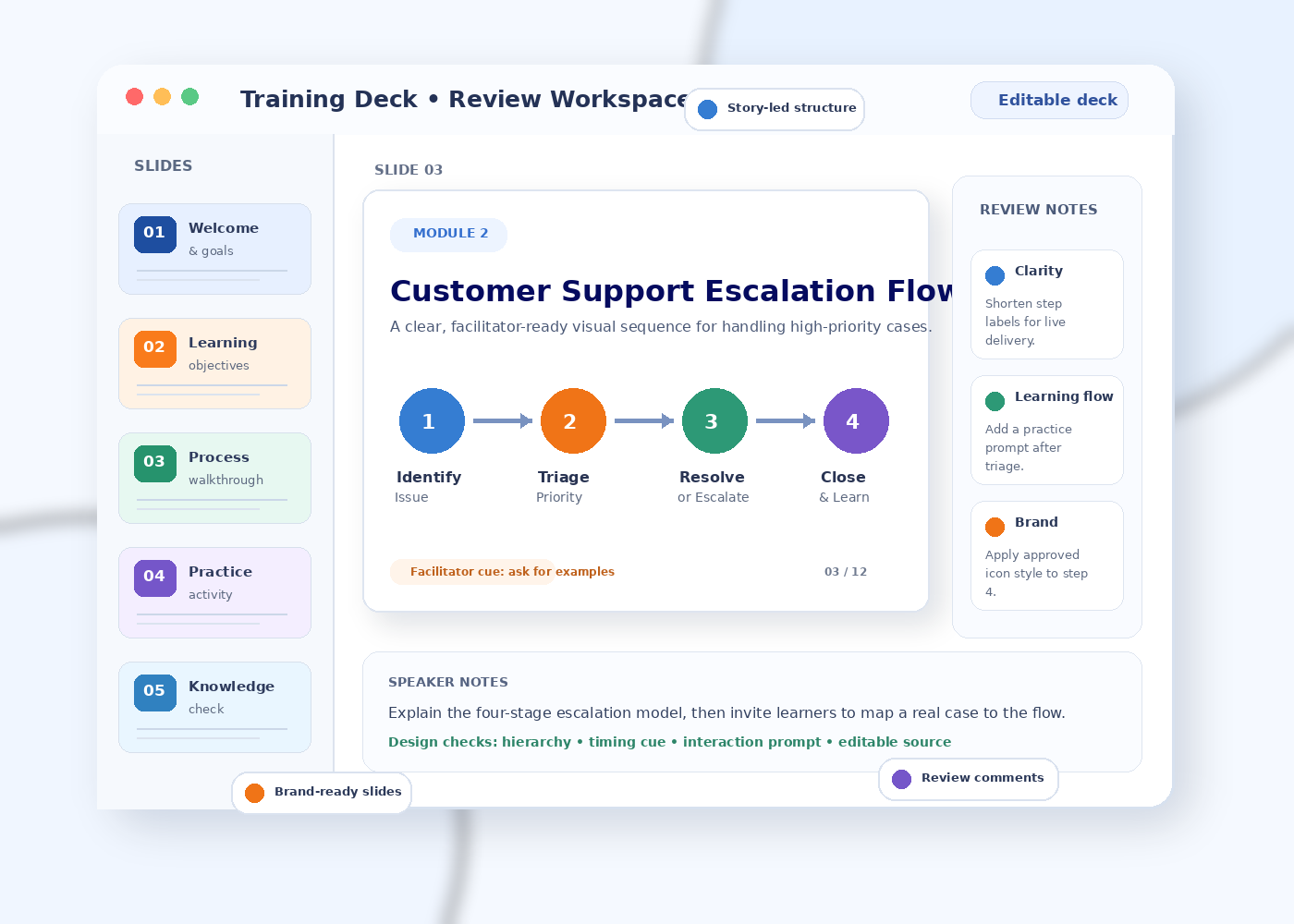
Convert source material into a purposeful presentation sequence.
Prioritize what learners need to notice, understand, and remember.
Organize delivery cues, discussion points, and practice moments.
Prepare reusable source files when editable handoff is part of scope.
Training decks are most useful when pricing covers a real slide set with learning hierarchy, facilitator usability, and editable handoff—not a vague per-slide design promise.
Suitable for: A short workshop segment, onboarding topic, process walkthrough, or internal learning deck that needs clearer structure and professional visual treatment.
Net-new long-form content writing, custom illustration, advanced data visualisation, motion design, complex animation, multiple deck formats, or rush production can increase the quote.
Presentation-focused support for organizations, training teams, educators, consultants, and subject experts who need learning content translated into clear, usable visual communication.
Build or redesign slide decks around learning objectives, key messages, visual hierarchy, and a coherent delivery sequence.
Map modules, sections, activities, examples, and transitions before detailed slide production begins.
Structure instructor-led sessions with agenda slides, concept explanations, exercises, debriefs, and recap moments.
Coordinate facilitator-facing presentation cues with learner-facing handouts, prompts, or activity references where requested.
Create slide-based visual assets and storyboard-ready presentation content for self-paced or blended learning workflows.
Review an existing training presentation for structure, density, visual consistency, delivery flow, and reuse across modules.
A practical sequence from source content to a presentation-ready learning asset, with review points built around accuracy, hierarchy, visual consistency, and delivery needs.
Review the audience, learning goals, source content, delivery format, brand guidance, and existing presentation assets.
Create a content map that defines slide groups, learning flow, examples, interaction points, and presentation depth.
Shape dense material into slide-ready headings, key points, diagrams, process steps, facilitator cues, and activity prompts.
Apply the visual system, layout hierarchy, iconography, diagrams, spacing, and brand treatment across the deck.
Resolve agreed stakeholder comments, check consistency, and prepare the confirmed presentation deliverables.
The goal is not to decorate slides. It is to make training information easier to navigate, explain, discuss, practise, and update.
Slide choices are tied back to the purpose of the session rather than visual decoration alone.
Long passages, process explanations, and reference material are reorganized into presentation-ready layers.
Headings, callouts, diagrams, examples, and activity slides follow a shared visual language across the deck.
Speaker cues, discussion prompts, and transitions can be positioned where they support delivery instead of competing with learner-facing content.
Comments can focus on content accuracy, brand alignment, learning flow, and usability against a visible slide system.
Training presentations can be structured around different delivery settings while keeping the learning story, visual language, and reusable content system consistent.
Facilitator-led slide sequences with discussion prompts, exercises, and debrief cues.
Screen-friendly layouts that prioritize legibility, pacing, participation, and clear transitions.
Presentation content structured to carry more context when a facilitator is not present.
Coordinate live slides, self-study presentation material, activity references, and follow-up content.
Adapt key presentation content into concise, mobile-friendly reference or recap material where requested.
Build presentation structures that help multiple facilitators deliver a common training story consistently.
The service can be scoped around many workplace learning subjects. The emphasis remains on how the content is organized and presented, not on inventing subject-matter facts.
For teams and experts who already know what must be taught but need stronger presentation structure, visual communication, and delivery-ready training assets.
A simplified example of the kind of transformation this service focuses on: reducing density, surfacing the core sequence, and separating facilitator guidance from learner-facing content.
Illustrative workflow example only — not a customer claim or measured result.
Training presentation work is most useful when subject accuracy, learning structure, visual design, facilitation needs, and stakeholder review are connected rather than handled as isolated tasks.
Defines accurate source content, terminology, examples, and constraints.
Shapes the learning story, section flow, slide purpose, and content density.
Applies hierarchy, layouts, diagrams, iconography, and brand treatment.
Checks delivery cues, discussion moments, activities, and practical usability.
Confirms content, brand, terminology, compliance, and rollout expectations.
One presentation system that keeps content, visuals, and delivery aligned.
Instead of relying on vague design feedback, stakeholders can review the presentation against practical dimensions that affect training use.
Terminology, facts, examples, process steps, and subject-specific meaning.
Whether each section prepares learners for what comes next and avoids unnecessary repetition.
What learners notice first, what belongs together, and what should move to notes or reference material.
Use of approved colors, typography, layouts, logos, illustration rules, and presentation templates.
Facilitator cues, pacing, activities, transitions, and the balance between speaking and on-screen content.
Choose a project shape that matches the state of your training content. Fixed pricing and turnaround are not stated on this page; scope is reviewed before a quote or delivery commitment is confirmed.
For an existing training presentation that needs stronger structure, visual hierarchy, consistency, and facilitator usability.
Request a scope reviewFor multiple modules that need a shared slide system, reusable patterns, consistent diagrams, and coordinated delivery assets.
Discuss the module setFor teams producing recurring training material that benefits from a repeatable presentation framework and consistent visual treatment.
Describe your workflowFor teams that need an expert review of slide architecture, content density, learner focus, template use, or presentation standards.
Request a presentation reviewPractical answers about scope, source material, redesign, content structuring, facilitator notes, brand alignment, editable files, review, pricing, delivery timing, and project setup.
It is presentation-focused support for turning training source material into a clear slide narrative with consistent visual hierarchy, learner-facing content, facilitator cues, activities, and editable presentation assets.
You can describe the material available, such as notes, SOPs, manuals, documents, scripts, existing slides, learning objectives, brand guidance, or a draft training outline. The final scope is confirmed after review.
Yes. Existing decks can be reorganized for clearer hierarchy, more consistent visual presentation, stronger slide-to-slide flow, and easier facilitation while retaining the required training content.
The service can cover presentation-focused content structuring as well as visual design. This may include reducing dense copy, creating slide headings, organizing learning points, and translating processes into diagrams or step-based visuals when included in the agreed scope.
Yes. The presentation structure can be adapted for live workshops, virtual sessions, blended delivery, or self-paced slide-based learning depending on the intended training format.
These elements can be incorporated when they are part of the requested training presentation scope, including speaker cues, discussion prompts, practice activities, reflection questions, and knowledge-check slides.
Yes. If you provide approved brand guidance or a presentation template, the deck can be designed within that visual system rather than introducing an unrelated style.
The delivery format is confirmed with the project scope. Where editable presentation files are required, the handoff can be prepared for continued internal updating and reuse.
Yes. A shared hierarchy, slide pattern, icon treatment, diagram style, and content framework can be applied across related modules so the training program feels consistent.
Review checkpoints are agreed with the project scope. Stakeholder comments can be consolidated around content accuracy, learning flow, visual hierarchy, brand alignment, and facilitator usability before final handoff.
This page does not state a fixed price or turnaround. Use the enquiry form to share the source material, slide volume, intended delivery format, brand requirements, and deadline so the scope can be reviewed.
Submit the enquiry form with the training topic, audience, source-content status, preferred presentation format, approximate slide volume if known, brand guidance, and deadline or target launch date.
Share the training topic, audience, source-content status, slide volume if known, delivery format, brand requirements, and deadline. The information helps define the most appropriate presentation scope.
Describe who the training is for and what learners should understand, practise, or be able to do.
Tell us whether you have an existing deck, SOP, manual, outline, script, SME notes, or another source format.
Specify live workshop, virtual training, self-paced presentation, blended learning, train-the-trainer, or another format.
Note whether an approved presentation template, brand guide, or visual reference must be followed.
Share the date you are working toward so feasibility can be reviewed before any delivery commitment is made.
Share your contact details and training presentation requirement below. Pricing and turnaround are confirmed after scope and deadline review.
Bring your source material, learning goals, and delivery context. We can help shape the content into a clearer, more consistent presentation system for learners and facilitators.